
Bike Universe Beginner Guide: Controls, Cash & Tricks
Use this Bike Universe beginner guide to learn PC controls, practice wheelies, earn cash through tricks, compare bikes, and prepare for police chases.
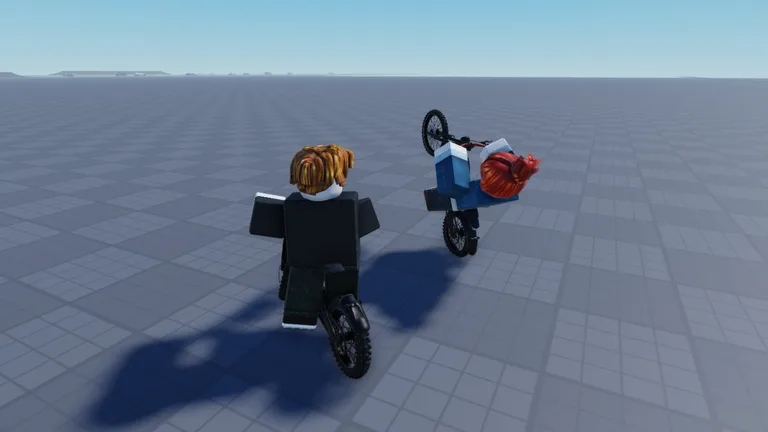
Get Rolling: Learn Your Bike Before Chasing Speed
A wheelie feels great until you lean too far back and scrape the pavement. This Bike Universe beginner guide helps you learn the controls, practice tricks, and understand bike stats before spending your cash. Use this Bike Universe beginner guide to build a repeatable riding routine, then work toward bigger jumps and police chases.
Bike Universe is a Roblox vehicle simulator with electric bikes, dirt bikes, pedal bikes, and skill-based riding. Its features include wheelies, tricks, burnouts, stompies, and two-seated bikes. The game is in beta, with substantial updates and changes ahead.
1. Learn the PC shortcuts
Start by separating riding controls from building controls. Q changes function when you enter build mode, so pay attention to which mode you have open.
| PC input | Function |
|---|---|
| Q | Spawn your bike during normal play |
| B | Open build mode |
| Q and E in build mode | Rotate a build piece |
| C | Open your phone |
| M | View the bike selection |
| Number keys, including 1, 3, and 4 | Perform tricks |
Practice opening and closing these menus before attempting jumps. Looking for a shortcut while approaching a ramp makes it harder to concentrate on the landing.
Keep trick experimentation separate from learning the menus. Spawn your bike, check the phone, inspect the bike selection, and then return your attention to riding.
2. Practice somewhere with room to recover
Choose an open stretch before working on wheelies or ramp approaches. Leave space to straighten the bike and finish each attempt without immediately turning into another obstacle.
Repeat a simple route while learning the handling. Use the same approach and aim for the same landing area. Changing your speed, direction, and trick together makes it harder to identify what needs adjustment.
The starting priority in this Bike Universe beginner guide is control: get comfortable riding the bike before adding more complicated movements.
Earn Cash Through Tricks and Controlled Practice
Tricks earn in-game cash, giving you a reason to practice beyond landing something impressive. Wheelies require balance, and leaning too far backward can make your rider scrape the ground or fall.
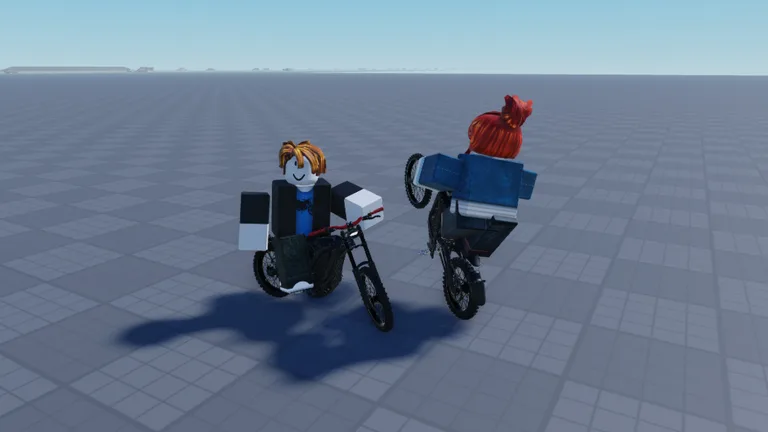 Image: Roblox / Bike Universe
3. Build a controlled wheelie
Begin with short attempts. Focus on raising the front wheel without pulling the bike so far back that you lose control.
After a scrape or fall, reduce how aggressively you lean backward on the next attempt. Work toward a wheelie you can deliberately finish instead of holding the position until the bike tips.
Keep your practice focused:
- Repeat wheelies before combining them with other tricks.
- Leave enough room to return to normal riding.
- Change one part of your attempt at a time.
- Stop adding difficulty when the basic movement becomes inconsistent.
A dramatic wheelie is fun, but use controlled attempts to learn where your balance starts breaking down.
4. Learn individual tricks before combinations
Bike Universe includes tricks such as the tail whip and Superman. Number keys activate tricks, but your rider also needs to return to the bike.
Practice a single trick on each jump. Concentrate on the movement and your return to the riding position before adding another action.
For a tail whip, watch the bike throughout the attempt. For a Superman, keep your attention on getting your rider back into position. Add combinations after you can complete the individual movements consistently.
Avoid pressing several trick inputs just because a jump gives you extra airtime. Give each action room to finish.
5. Connect cash practice with skill practice
Use trick attempts to work on a specific weakness while earning cash. Alternate between controlled wheelies and jumps if repeating the same movement starts making your timing sloppy.
Keep your cash target tied to a bike you have actually inspected. That gives your practice a clear purpose without assuming the most expensive option matches your riding style.
The cash advice in this Bike Universe beginner guide follows the game's trick system: practice manageable moves, improve your execution, and compare bikes before spending.
Compare Bikes and Robux Purchases Carefully
Bike Universe offers several bike categories, but appearance and speed are only part of the decision. Check the handling and trick ratings alongside acceleration and top speed.
6. Read the whole bike stat panel
Press M to view the bike selection and compare the displayed attributes.
The Ninja H2R illustrates why this matters:
| Ninja H2R attribute | Displayed rating |
|---|---|
| Top speed | 10 |
| Acceleration | 9.8 |
| Handling | 9.6 |
| Tricks | 2.5 |
Its trick rating sits well below its other displayed ratings. If you are shopping specifically to practice tricks, compare that field before getting distracted by the speed number.
The Surron is another option to inspect for trick riding. Compare its current attributes with the bike you already use, then decide which differences matter to your practice.
Keep these comparisons focused on your next goal. Check trick attributes for stunt practice and speed attributes when comparing faster bikes.
7. Separate bike shopping from game passes
In-game bike purchases and Robux game passes are separate spending decisions. The game pass prices below are the October 19, 2026 prices.
| Game pass | Price |
|---|---|
| Luxury Pack | 599 Robux |
| Stryk Vorg | 399 Robux |
| More Builds | 99 Robux |
| 2X Cash | 199 Robux |
| VIP | 249 Robux |
The Stryk Vorg pass grants the stark varg in-game. Read each purchase screen before spending Robux, especially while the game is in beta.
Defer purchases until you understand the activity you want to focus on. Try riding, tricks, and building before deciding which paid additions interest you.
Keep this Bike Universe beginner guide beside your shopping decisions: compare the relevant stats, check the price, and buy around a clear riding goal.
Build Ramps and Improve Your Jump Routine
Build mode lets you place riding features and create your own stunt setup. Press B to open it, then use Q and E to rotate pieces.
8. Start with a simple ramp setup
The building options include a kicker and a launch ramp. Quarter pipes and mega ramps also appear among the options, with game passes involved in accessing some pieces.
Start with the pieces available to you. Align a ramp with your approach and leave room beyond it for landing.
Use this practice sequence:
- Open build mode with B.
- Choose an available ramp piece.
- Rotate it with Q and E to match your approach.
- Place it with room to approach and land.
- Ride toward it without adding a trick.
- Add a single trick once you understand the jump.
Keep the layout simple enough that you can repeat the same approach. Add more pieces after the existing setup gives you a useful practice route.
9. Fix the approach before adding tricks
If you repeatedly struggle with a jump, simplify the attempt. Remove the trick and concentrate on reaching the ramp straight.
Adjust your approach speed separately from your trick timing. Once you can make the jump cleanly, bring the trick back into the routine.
Avoid changing the ramp layout after every failed attempt. Repeat the setup long enough to see whether your approach needs work.
The building section of this Bike Universe beginner guide serves one purpose: create a jump you can practice deliberately. A larger ramp adds little value if you are still struggling to approach it consistently.
Handle Police, Events, and Common Beginner Mistakes
AI cops add another activity beyond riding and building. The phone includes an option to play with or without police, giving you control over when to include them.
10. Separate police chases from trick practice
Press C to open your phone and use the police option to match your session.
Turn police off while concentrating on a new jump or unfamiliar trick. Turn them on when you want to include chases in your riding.
Explore the phone while stationary, too. It includes messaging, photos, and a gallery, so give yourself time to browse without trying to steer simultaneously.
11. Check event dates before planning a rideout
The next scheduled events include Halloween content and a global rideout.
| Event | Dates | Announced features |
|---|---|---|
| Halloween Event | October 21–November 7, 2026 | New bikes, event features, limited-time items, and limited-time bikes |
| WEEKLY GLOBAL RIDEOUT! | October 24–25, 2026 | 100-player servers, cash giveaways, and new content |
The standard server maximum recorded on October 19 was 20 players. The 100-player servers are advertised for rideout events; keep that distinction in mind when organizing a group.
The experience also includes Bike Universe - Sunset City alongside its start place.
Open the Bike Universe Roblox experience when you are ready to play or check its upcoming events.
12. Avoid stacking several challenges together
Review this Bike Universe beginner guide when practice starts feeling frustrating. Simplify the activity that is causing trouble:
- After repeated wheelie crashes, shorten the attempt.
- After missed landings, practice the jump without a trick.
- Before buying a faster bike, compare its trick rating.
- While learning a ramp setup, keep police off.
- Before rotating a build piece, check that build mode is open.
Finish each practice session with a manageable goal: a controlled wheelie, a clean jump, or a single completed trick. Build on that movement during your next ride.
FAQ
What should I practice first in Bike Universe?
Start with basic handling and controlled wheelies, then move to a simple ramp jump. Use this Bike Universe beginner guide to separate each skill before combining jumps, tricks, and police chases.
How do you earn cash in Bike Universe?
Perform tricks to earn in-game cash. Practice wheelies and individual aerial tricks, then compare bikes in the bike selection before choosing what to buy.
What are the main Bike Universe PC shortcuts?
Press Q to spawn your bike, B for build mode, C for your phone, and M to view bikes. In build mode, Q and E rotate pieces. Number keys, including 1, 3, and 4, perform tricks.
Can you turn off police in Bike Universe?
Yes. Open your phone with C and use the police option to play without them. Turn police back on when you want to include chases in your session.
Continue with
 Bike Universe Build Mode: Ramps, Controls, and TipsLearn Bike Universe build mode controls, rotate ramps with Q and E, explore ramp options, and practice cleaner tricks with a simple setup. Start building.
More in Guide
Bike Universe AI Cops Guide: Police Settings and Tips
Learn how Bike Universe AI Cops settings work, turn police on or off, recover a bike, and practice tricks with tips for riding and earning cash on Roblox.
Bike Universe How to Earn Cash: Tricks and Bike Tips
Bike Universe how to earn cash explained: practice wheelies, build ramps, compare bike stats, and learn about the 2X Cash pass before your bike purchase.
Join the community
Official channels for news, updates and player help: