
Bike Universe Keyboard Controls: Ride, Build & Tricks
Learn Bike Universe keyboard controls for spawning bikes, opening your phone, building ramps, and using trick keys. Practice smoother runs and landings.
Jump to
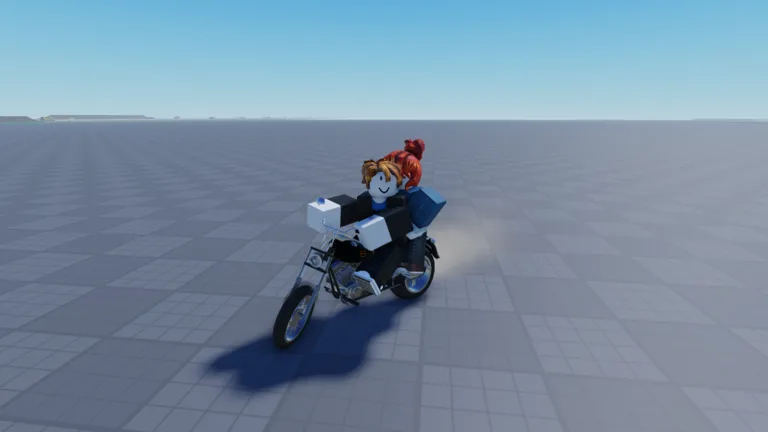
What Are the Bike Universe Keyboard Controls?
Get your bike back with Q, open build mode with B, and bring up your phone with C—these Bike Universe keyboard controls put the main tools within easy reach. Learning their different uses matters because Q also rotates objects in build mode, where it works alongside E. Start with the Bike Universe keyboard controls below, then practice your tricks and ramp placement separately before combining them.
| Key | Action | Context |
|---|---|---|
| Q | Spawn your bike or get it back quickly | Regular gameplay |
| B | Open build mode | Building ramps and other objects |
| Q / E | Rotate a build object | Build mode |
| C | Open your phone | Accessing phone features |
| M | View the different bikes | Browsing bikes |
| 1, 3, 4 | Perform tricks | Trick gameplay |
The main distinction to remember is the difference between riding and building. When you are working on a ramp, Q belongs to object placement. When you need your bike back during regular gameplay, Q handles that instead.
Bike Universe combines realistic physics with skill-based wheelies and tricks. Knowing the shortcuts gets you into the action, but balance, approach speed, and landing control still matter once you start riding.
The game is in beta, with substantial updates and changes part of its development. This guide covers the Roblox beta controls and features available in October 2026.
Spawn Your Bike and Learn the Mode Changes
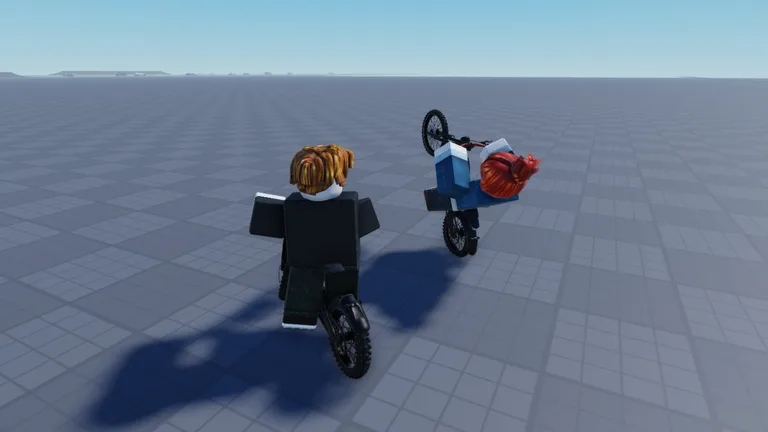 Image: Roblox / Bike Universe
Press Q to spawn your bike. It is also the shortcut to remember when you want to get your bike back quickly after a failed attempt.
Make this the starting point of your practice session. Spawn the bike, get comfortable with its handling, and attempt a manageable trick before moving on to a larger ramp. Keep your attention on what caused the fall: leaning too far back, taking an awkward approach, or failing to finish the trick before landing.
Keep Q’s Two Jobs Separate
Among the Bike Universe keyboard controls, Q deserves extra attention because its job changes in build mode.
Use this simple distinction:
- Need your bike? Use Q during regular gameplay.
- Working on a build object? Use Q and E to rotate it.
Before pressing Q repeatedly, look at what you are currently doing. A ramp-placement session and a riding session require different inputs, even though they share a key.
Practice those actions separately. Open build mode, rotate a ramp, and finish arranging your setup before returning to riding. That gives you less to think about during the approach.
Recover Without Changing Everything
After a crash, get your bike back with Q and repeat the attempt with a specific adjustment.
If you leaned too far backward during a wheelie, focus on balance. If the ramp approach lacked speed, work on the approach. If a trick ended in an awkward landing, simplify the attempt and concentrate on returning to the bike.
Keep the setup consistent while you work on the movement. Changing the bike, ramp, and trick together makes it harder to identify which adjustment helped.
These practice habits follow directly from the game’s physics-based riding: your input, your bike, and the shape of your jump all contribute to the result.
Use B, Q, and E to Build Your Ramp Setup
Press B to open build mode, then use Q and E to rotate the object you are placing. Building lets you create a setup for practicing tricks instead of relying entirely on the terrain around you.
The build options include kickers, launch ramps, quarter pipes, and mega ramps. Some ramp options require game passes, so check the requirements on an object before planning a setup around it.
| Build control or object | Function |
|---|---|
| B | Opens build mode |
| Q / E | Rotates a build object |
| Kicker | Ramp option in build mode |
| Launch ramp | Ramp option in build mode |
| Quarter pipe | Ramp option in build mode |
| Mega ramp | Ramp option in build mode |
Arrange the Approach Before Attempting the Trick
Use the Bike Universe keyboard controls for building to give yourself a deliberate route into the jump.
- Open build mode with B.
- Choose an available ramp.
- Rotate it with Q and E to line it up with your intended approach.
- Place the ramp, then practice riding toward it.
- Adjust your attempt based on how the approach and landing feel.
Choose a ramp you can approach consistently. Look at the direction it faces before trying to carry speed into it; a poorly aligned setup adds another problem to solve while you are already managing a trick.
Keep the practice area straightforward while learning. Add more objects after you can use the existing setup comfortably.
Match Your Approach to the Ramp
A larger ramp still needs enough approach speed. The mega ramp is a useful reminder to think about the run-up before focusing on the stunt you want to perform.
Build around a route you can repeat. Approach from a consistent direction, watch how the bike reaches the ramp, and adjust your riding before adding a more complicated trick.
If you keep missing the approach, return to the placement tools. Use Q and E to change the ramp’s orientation, then try the revised line. Building and riding work together here: the ramp is part of the setup you control.
Practice Trick Keys, Wheelies, and Landings
The number keys 1, 3, and 4 activate tricks. Bike Universe also includes wheelies, burnouts, and “Stompies,” alongside aerial moves such as the tail whip and Superman.
Learn the Bike Universe keyboard controls for tricks through deliberate practice. Use a manageable jump, try a trick input, and pay attention to the rider’s position before landing.
| Trick or riding feature | What to focus on |
|---|---|
| Wheelie | Balance; leaning too far backward can cause a fall |
| Number-key tricks | Use 1, 3, and 4 to perform tricks |
| Tail whip | Practice completing the move and landing |
| Superman | Practice returning to the bike before landing |
| Combined aerial tricks | Finish individual moves before adding a sequence |
Keep Wheelies Under Control
A wheelie is a balancing task. Pulling too far backward can make the rider scrape and fall, so focus on holding a controlled position instead of pushing for the steepest angle.
Build your practice around the point where the bike starts becoming difficult to manage. Ease back from that position and work on repeating a steadier wheelie.
Watch the bike rather than looking down at your keyboard throughout the attempt. Memorize the relevant inputs before starting so you can keep your attention on balance and direction.
Finish the Trick Before the Landing
Returning to the bike matters when performing tricks. Give the movement time to finish, then focus on meeting the landing in a controlled position.
Start with an individual move. Once you can repeat it comfortably, try combining tricks during a larger jump. The game supports sequences involving moves such as a Superman, tail whip, and front flip, but approach speed and execution still determine how the attempt plays out.
Avoid adding another move simply because you are still airborne. Practice completing the current trick cleanly before extending the sequence.
Use Trick Cash as a Reason to Practice
Performing tricks earns in-game cash. That connects stunt practice with buying more bikes, giving you a practical reason to improve your execution.
Repeat a trick you can manage while refining your approach and landing. Work on consistency before expanding the routine.
The Bike Universe keyboard controls get the move started; the useful practice happens when you learn how the bike behaves during the jump. Treat a failed landing as a reason to adjust the attempt, then use Q to get your bike back and continue.
Open Your Phone and Compare Bikes
Press C to open the phone, and press M to view the different bikes. These shortcuts help you move between riding, phone features, and bike browsing.
The phone includes messaging, photos, a gallery, and settings such as police options. Use it to explore those features when you take a break from practicing.
| Shortcut or feature | What it opens or provides |
|---|---|
| C | Phone |
| M | Different bikes |
| Phone camera and gallery | Photos and saved images |
| Phone messages | Messaging features |
| Police options | Police-related settings |
| Bike dealer | Bikes available to buy |
Compare Handling and Tricks Alongside Speed
Bike Universe includes electric bikes, dirt bikes, and pedal bikes. When browsing, look beyond speed and compare the attributes relevant to the riding you want to practice.
The Ninja H2R has these displayed ratings:
- Top speed: 10
- Acceleration: 9.8
- Handling: 9.6
- Tricks: 2.5
Those separate attributes give you more to consider than how fast a bike can travel. For trick practice, inspect the tricks rating alongside handling. For faster riding, compare top speed and acceleration while still paying attention to how the bike behaves.
Use the bike dealer to browse purchases, and keep practicing tricks to earn cash toward another bike.
Put the Shortcuts Into a Practice Routine
Once the Bike Universe keyboard controls feel familiar, connect them to the activity you want to practice:
- Spawn your bike with Q.
- Choose a trick or wheelie to work on.
- Use B if you need a ramp setup.
- Rotate build objects with Q and E.
- Practice the approach, move, and landing.
- Use C or M when you want to explore phone features or bikes.
Keep each session focused on a manageable goal. Practice a steadier wheelie, a cleaner tail whip, or a more consistent ramp approach before combining them.
You can play Bike Universe on Roblox and put the shortcuts into practice.
FAQ
What are the main Bike Universe keyboard controls?
Use Q to spawn your bike or get it back, B to open build mode, C to open the phone, and M to view bikes. In build mode, Q and E rotate objects. The number keys 1, 3, and 4 activate tricks.
How do you rotate ramps in Bike Universe?
Open build mode with B, then use Q and E to rotate the build object. Line the ramp up with your intended approach before placing it.
Why do I fall backward during a wheelie?
Leaning too far backward can make the rider scrape and fall. Practice holding a more controlled angle, keeping your attention on the bike’s balance as you ride.
How do you earn cash while practicing controls?
Perform tricks to earn in-game cash. Practice completing the move, returning to the bike, and landing cleanly, then use your cash to buy bikes through the bike dealer.
Continue exploring
Bike Universe AI Cops Guide: Police Settings and Tips
Learn how Bike Universe AI Cops settings work, turn police on or off, recover a bike, and practice tricks with tips for riding and earning cash on Roblox.
Bike Universe Beginner Guide: Controls, Cash & Tricks
Use this Bike Universe beginner guide to learn PC controls, practice wheelies, earn cash through tricks, compare bikes, and prepare for police chases.
Join the community
Official channels for news, updates and player help: